OPEN FIRMWARE · AKAI MPK MINI IV
OPEN
MPK4
Your MPK mini IV, rewritten as a MIDI sequencer: an 8-track looper with chords, an arpeggiator, step edit and nine mod-wheel effects, all on its own screen. It makes no sound itself: it plays your synths, DAW, sampler or modular over USB or the DIN MIDI out. With DIN gear, no computer needed.
 Reverbose
WHAT IT IS
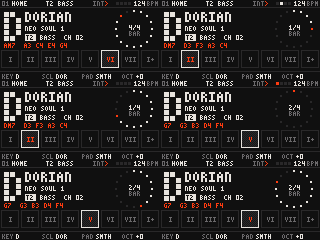
OPEN MPK4 replaces the firmware of the Akai MPK mini IV with one built for making music on the device itself. The keys always play a scale, so nothing sounds wrong. The pads play that scale's chords. A looper holds 8 tracks, each on its own MIDI channel and output (USB, DIN or both), so each track drives its own synth.
It is pure MIDI: it works with any DAW, hardware synth or sequencer. The 160 × 80 screen, the pads' colours and the mod wheel all become part of the instrument.
FEATURES
LOOPER
Every pass is an undoable take. Each track has its own channel, output, length (polymeter) and swing. 8 patterns that switch at the loop end, chained into a song.
HARMONY
27 scales (chromatic included) and 53 chord styles. The keys play the scale, the pads its chords, coloured as home, away and tension. Change key or style while holding: the notes follow.
ARPEGGIATOR
Modes, divisions, octaves, swing, gate, accent and ratchet, with latch. The looper records what it plays.
MOD WHEEL
Each track's wheel plays its own effect, on that track only. Hold SHIFT and move the wheel to pick one.
STEP EDIT
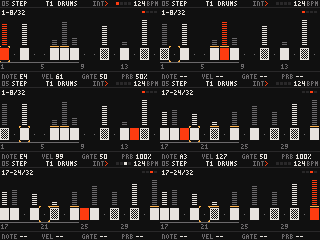
The pads become 8 steps of the track: note, velocity, gate, probability, ratchet and accent per step.
CLOCK
Lead or follow USB clock, send it to USB and DIN: the MPK can sit between a DAW and DIN gear. Metronome included.
TRACKS ARE INSTRUMENTS
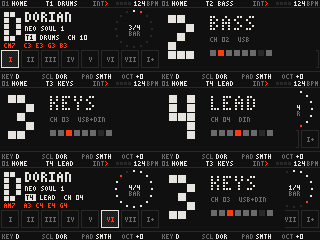
Switch tracks and the keys, pads and arp play the new one; every other track keeps looping. The screen shows the track big, with its channel and output.
STEP EDIT
SHIFT + EDIT turns the pads into steps. While the loop plays, the page follows the playhead; what you edit plays at once.
NINE WHEEL EFFECTS
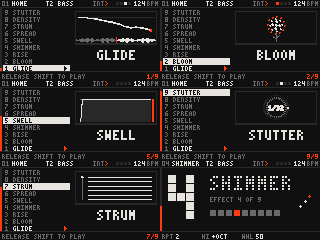
All MIDI (notes, pitch bend, CC 11), so they work with any synth. Every effect has its own view on the screen. Recorded loops stay as you played them: the effect shapes what you hear, never what was recorded.
PICK WITH SHIFT + WHEEL
The nine effects stand in a column in the order of the wheel's travel. The one under the wheel previews itself. Let go of SHIFT and it plays at once, easing in from nothing.
BOOT AND THEMES
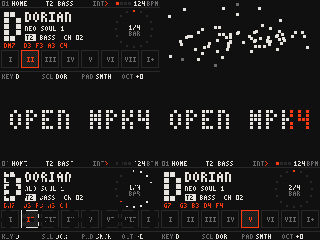
BOOT
Dots drift in and assemble the logo, a playhead sweeps it with the pads lighting in the same wave, then it dissolves into HOME.
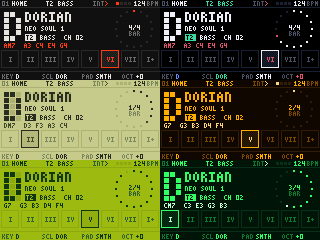
7 THEMES
EMBER, OP NEON, LCD OLIVE, AMBER, PAPER, DMG, PHOSPHOR. The phosphor themes keep an afterglow.
INSTALL
- Download the latest
openmpk4_*.binfrom Releases and get the source (for the flasher). - Install Python 3 and the HID library:
pip install hidapi
- Plug in the MPK mini IV and flash. The tool checks the image, enters update mode by itself and asks once:
python3 tools/mpk4_flash.py flash openmpk4.bin --write
- The unit restarts into OPEN MPK4. The manual covers every control.
AI INSTALL PROMPT
Prefer a guide? Paste this into your AI assistant: it walks you through the install step by step.
Loading…
SAFETY
- Akai's bootloader stays untouched: the image carries it unchanged, and the flasher checks it against the genuine one before writing anything.
- Recovery is always there: unplug, hold SHIFT + UNDO, plug in. The screen shows "Upgrade" and the flasher works.
- Back to stock any time: flash Akai's own firmware the same way.